C# Newton json 사용방법 (part - 2)

Software/C#|2023. 1. 27. 14:46
반응형

part-2 에서는 part-1에서 사용된 방법에서 좀더 직관적으로 코드를 작성하는 방법을 설명합니다. 

저장되는 데이타 형식은 동일하지만 코드를 생성하거나 분석하는데 있어 좀더 직관적으로 보일 수 있습니다.

코딩량도 많이 줄어 듭니다. 

private bool saveConfigData(string FileName)
{
	bool result = true ;

	try
	{
 		var jsonLIVParam = new JObject()
		{
			{"Start Current", 0},
			{"Stop Current", 100},
			{"Step Current", 0.1},
			{"Array", new JArray { 10, 20, 100 }}
		};

		var LIVObject = new JObject()
		{
			{"LIV Test", jsonLIVParam}
		};

		using (System.IO.StreamWriter file = new System.IO.StreamWriter(FileName, false))
		{
			file.WriteLine(LIVObject.ToString());
		}
	}
	catch
	{
		result = false ;
	}
    
	return result ;
}

private bool loadConfigData(string FileName)
{
    bool result = true ;
    int index = 0 ;

	try
	{
		string text = System.IO.File.ReadAllText(FileName);
		JObject jobj = JObject.Parse(text); //문자를 객체화

		var startCurrent = int.Parse(jobj["LIV Test"]["Start Current"].ToString()) ;
		var stopCurrent = int.Parse(jobj["LIV Test"]["Stop Current"].ToString()) ;
		var stopCurrent = float.Parse(jobj["LIV Test"]["Step Current"].ToString()) ;

		int[] arrayValue = new int[3] ;

		foreach(var elememts in jobj["LIV Test"]["Array"])
		{
			arrayValue[index++] = (int)elememts ;
		}
	}
	catch
	{
		result = false ;
	}
    
	return result ;
}
반응형

댓글()

Contec 사의 GPIB 카드 (GP-IB(PCI)F) 제어를 위한 Class (C#)

Software/C#|2023. 1. 19. 13:53
반응형

일본 Contec 사의 GPIB 통신 카드인 GP-IB(PCI)F 를 사용하기 위한 Class 입니다. C++ 로 제작되어서 제공되는 DLL 라이브러리를 사용합니다. Contec 사에서는 C#을 위한 별도의 라이브러리는 제공을 안하고 DLL을 사용한 예제 코드만 제공합니다. 

APIGPIB1.dll
0.18MB

DLL 파일은 올려둔 파일을 사용하시거나 제공받은 CD에서 드라이버를 설치하시면 찾을 수 있습니다. 

여기서는 통신에 꼭 필요한 기능만 멤버 함수로 만들었습니다. 필요한 부분은 더 추가하셔서 만들어 쓰시면 되겠습니다. 

using System;
using System.Text;
using System.Runtime.InteropServices;

namespace CGpibModule
{
    public class CContecGpib
    {
        [DllImport("apigpib1.dll")] static extern uint GpIni();
		[DllImport("apigpib1.dll")] static extern uint GpIfc(uint IfcTime);
		[DllImport("apigpib1.dll")] static extern uint GpRen();
		[DllImport("apigpib1.dll")] static extern uint GpResetren();
		[DllImport("apigpib1.dll")] static extern uint GpTalk(uint[] Cmd, uint Srlen, string Srbuf);
        [DllImport("apigpib1.dll")] static extern uint GpTalk(uint[] Cmd, uint Srlen, byte[] Srbufb);
		[DllImport("apigpib1.dll")] static extern uint GpListen(uint[] Cmd, ref uint Srlen, StringBuilder Srbuf);
        [DllImport("apigpib1.dll")] static extern uint GpListen(uint[] Cmd, ref uint Srlen, byte[] Srbufb);
        [DllImport("apigpib1.dll")] static extern uint GpPoll(uint[] Cmd, uint[] Pstb);
		[DllImport("apigpib1.dll")] static extern uint GpSrq(uint Eoi);
		[DllImport("apigpib1.dll")] static extern uint GpStb(uint Stb);
		[DllImport("apigpib1.dll")] static extern uint GpDelim(uint Delim, uint Eoi);
		[DllImport("apigpib1.dll")] static extern uint GpTimeout(uint Timeout);
		[DllImport("apigpib1.dll")] static extern uint GpChkstb(ref uint Stb, ref uint Eoi);
		[DllImport("apigpib1.dll")] static extern uint GpReadreg(uint Reg, ref uint Preg);
		[DllImport("apigpib1.dll")] static extern uint GpDma(uint Dmamode, uint Dmach);
		[DllImport("apigpib1.dll")] static extern uint GpExit();
		[DllImport("apigpib1.dll")] static extern uint GpComand(uint[] Cmd);
		[DllImport("apigpib1.dll")] static extern uint GpDmainuse();
		[DllImport("apigpib1.dll")] static extern uint GpStstop(uint Stp);
		[DllImport("apigpib1.dll")] static extern uint GpDmastop();
		[DllImport("apigpib1.dll")] static extern uint GpPpollmode(uint Pmode);
		[DllImport("apigpib1.dll")] static extern uint GpStppoll(uint[] Cmd, uint Stppu);
		[DllImport("apigpib1.dll")] static extern uint GpExppoll(ref uint Pprdata);
		[DllImport("apigpib1.dll")] static extern uint GpStwait(uint Buscode);
		[DllImport("apigpib1.dll")] static extern uint GpWaittime(uint Timeout);
		[DllImport("apigpib1.dll")] static extern uint GpReadbus(ref uint Bussta);
		[DllImport("apigpib1.dll")] static extern uint GpSfile(uint[] Cmd, uint Srlen, string Fname);
		[DllImport("apigpib1.dll")] static extern uint GpRfile(uint[] Cmd, uint Srlen, string Fname);
		[DllImport("apigpib1.dll")] static extern uint GpSdc(uint Adr);
		[DllImport("apigpib1.dll")] static extern uint GpDcl();
		[DllImport("apigpib1.dll")] static extern uint GpGet(uint Adr);
		[DllImport("apigpib1.dll")] static extern uint GpGtl(uint Adr);
		[DllImport("apigpib1.dll")] static extern uint GpLlo();
		[DllImport("apigpib1.dll")] static extern uint GpTct(uint Adr);
		[DllImport("apigpib1.dll")] static extern uint GpCrst(uint Adr);
		[DllImport("apigpib1.dll")] static extern uint GpCopc(uint Adr);
		[DllImport("apigpib1.dll")] static extern uint GpCwai(uint Adr);
		[DllImport("apigpib1.dll")] static extern uint GpCcls(uint Adr);
		[DllImport("apigpib1.dll")] static extern uint GpCtrg(uint Adr);
		[DllImport("apigpib1.dll")] static extern uint GpCpre(uint Adr, uint Stb);
		[DllImport("apigpib1.dll")] static extern uint GpCese(uint Adr, uint Stb);
		[DllImport("apigpib1.dll")] static extern uint GpCsre(uint Adr, uint Stb);
		[DllImport("apigpib1.dll")] static extern uint GpQidn(uint Adr, ref uint Srlen, StringBuilder Srbuf);
		[DllImport("apigpib1.dll")] static extern uint GpQopt(uint Adr, ref uint Srlen, StringBuilder Srbuf);
		[DllImport("apigpib1.dll")] static extern uint GpQpud(uint Adr, ref uint Srlen, StringBuilder Srbuf);
		[DllImport("apigpib1.dll")] static extern uint GpQrdt(uint Adr, ref uint Srlen, StringBuilder Srbuf);
		[DllImport("apigpib1.dll")] static extern uint GpQcal(uint Adr, ref uint Srlen, StringBuilder Srbuf);
		[DllImport("apigpib1.dll")] static extern uint GpQlrn(uint Adr, ref uint Srlen, StringBuilder Srbuf);
		[DllImport("apigpib1.dll")] static extern uint GpQtst(uint Adr, ref uint Srlen, StringBuilder Srbuf);
		[DllImport("apigpib1.dll")] static extern uint GpQopc(uint Adr, ref uint Srlen, StringBuilder Srbuf);
		[DllImport("apigpib1.dll")] static extern uint GpQemc(uint Adr, ref uint Srlen, StringBuilder Srbuf);
		[DllImport("apigpib1.dll")] static extern uint GpQgmc(uint Adr, ref uint Srlen, StringBuilder Srbuf);
		[DllImport("apigpib1.dll")] static extern uint GpQlmc(uint Adr, ref uint Srlen, StringBuilder Srbuf);
		[DllImport("apigpib1.dll")] static extern uint GpQist(uint Adr, ref uint Srlen, StringBuilder Srbuf);
		[DllImport("apigpib1.dll")] static extern uint GpQpre(uint Adr, ref uint Srlen, StringBuilder Srbuf);
		[DllImport("apigpib1.dll")] static extern uint GpQese(uint Adr, ref uint Srlen, StringBuilder Srbuf);
		[DllImport("apigpib1.dll")] static extern uint GpQesr(uint Adr, ref uint Srlen, StringBuilder Srbuf);
		[DllImport("apigpib1.dll")] static extern uint GpQpsc(uint Adr, ref uint Srlen, StringBuilder Srbuf);
		[DllImport("apigpib1.dll")] static extern uint GpQsre(uint Adr, ref uint Srlen, StringBuilder Srbuf);
		[DllImport("apigpib1.dll")] static extern uint GpQstb(uint Adr, ref uint Srlen, StringBuilder Srbuf);
		[DllImport("apigpib1.dll")] static extern uint GpQddt(uint Adr, ref uint Srlen, StringBuilder Srbuf);
		[DllImport("apigpib1.dll")] static extern uint GpTaLaBit(uint TaLaSts);
		[DllImport("apigpib1.dll")] static extern uint GpBoardsts(uint Reg, ref uint Preg);
		[DllImport("apigpib1.dll")] static extern uint GpSrqEvent(int hWnd, ushort wMsg, uint SrqOn);
		[DllImport("apigpib1.dll")] static extern uint GpSrqEventEx(int hWnd, ushort wMsg, uint SrqOn);
		[DllImport("apigpib1.dll")] static extern uint GpSrqOn();
		[DllImport("apigpib1.dll")] static extern uint GpDevFind(uint[] Fstb);
		[DllImport("apigpib1.dll")] static extern byte GpInpB(short Port);
		[DllImport("apigpib1.dll")] static extern short GpInpW(short Port);
		[DllImport("apigpib1.dll")] static extern int  GpInpD(short Port);
		[DllImport("apigpib1.dll")] static extern byte GpOutB(short Port, byte Dat);
		[DllImport("apigpib1.dll")] static extern short GpOutW(short Port, short Dat);
		[DllImport("apigpib1.dll")] static extern int  GpOutD(short Port, int Dat);
		[DllImport("apigpib1.dll")] static extern uint GpSetEvent(uint EventOn);
		[DllImport("apigpib1.dll")] static extern uint GpSetEventSrq(int hWnd, ushort wMsg, uint SrqOn);
		[DllImport("apigpib1.dll")] static extern uint GpSetEventDet(int hWnd, ushort wMsg, uint DetOn);
		[DllImport("apigpib1.dll")] static extern uint GpSetEventDec(int hWnd, ushort wMsg, uint DetOn);
		[DllImport("apigpib1.dll")] static extern uint GpSetEventIfc(int hWnd, ushort wMsg, uint IfcOn);
		[DllImport("apigpib1.dll")] static extern uint GpEnableNextEvent();
		[DllImport("apigpib1.dll")] static extern uint GpSrqEx(uint Stb, uint SrqFlag, uint EoiFlag);
		[DllImport("apigpib1.dll")] static extern uint GpUpperCode(uint UpperCode);
		[DllImport("apigpib1.dll")] static extern uint GpCnvSettings(string HeaderStr, string UnitStr, string SepStr, uint SfxFlag);
		[DllImport("apigpib1.dll")] static extern uint GpCnvSettingsToStr(uint PlusFlag, uint Digit, uint CutDown);
		[DllImport("apigpib1.dll")] static extern uint GpCnvStrToDbl(string Str, ref double DblData);
		[DllImport("apigpib1.dll")] static extern uint GpCnvStrToDblArray(string Str, double[] DblData, ref uint ArraySize);
		[DllImport("apigpib1.dll")] static extern uint GpCnvStrToFlt(string Str, ref float FltData);
		[DllImport("apigpib1.dll")] static extern uint GpCnvStrToFltArray(string Str, float[] FltData, ref uint ArraySize);
		[DllImport("apigpib1.dll")] static extern uint GpCnvDblToStr(StringBuilder Str, ref uint StrSize, double DblData);
		[DllImport("apigpib1.dll")] static extern uint GpCnvDblArrayToStr(StringBuilder Str, ref uint StrSize, double[] DblData, uint ArraySize);
		[DllImport("apigpib1.dll")] static extern uint GpCnvFltToStr(StringBuilder Str, ref uint StrSize, float FltData);
		[DllImport("apigpib1.dll")] static extern uint GpCnvFltArrayToStr(StringBuilder Str, ref uint StrSize, float[] FltData, uint ArraySize);
		[DllImport("apigpib1.dll")] static extern uint GpPollEx(uint[] Cmd, uint[] Pstb, uint[] Psrq);
		[DllImport("apigpib1.dll")] static extern uint GpSlowMode(uint SlowTime);
		[DllImport("apigpib1.dll")] static extern uint GpCnvCvSettings(uint Settings);
		[DllImport("apigpib1.dll")] static extern uint GpCnvCvi(byte[] Str, ref short ShtData);
		[DllImport("apigpib1.dll")] static extern uint GpCnvCviArray(byte[] Str, short[] ShtData, uint ArraySize);
		[DllImport("apigpib1.dll")] static extern uint GpCnvCvs(byte[] Str, ref float FltData);
		[DllImport("apigpib1.dll")] static extern uint GpCnvCvsArray(byte[] Str, float[] FltData, uint ArraySize);
		[DllImport("apigpib1.dll")] static extern uint GpCnvCvd(byte[] Str, ref double DblData);
		[DllImport("apigpib1.dll")] static extern uint GpCnvCvdArray(byte[] Str, double[] DblData, uint ArraySize);
		[DllImport("apigpib1.dll")] static extern uint GpTalkEx(uint[] Cmd, ref uint Srlen, string Srbuf);
        [DllImport("apigpib1.dll")] static extern uint GpTalkEx(uint[] Cmd, ref uint Srlen, byte[] Srbufb);
		[DllImport("apigpib1.dll")] static extern uint GpListenEx(uint[] Cmd, ref uint Srlen, StringBuilder Srbuf);
        [DllImport("apigpib1.dll")] static extern uint GpListenEx(uint[] Cmd, ref uint Srlen, byte[] Srbufb);
		[DllImport("apigpib1.dll")] static extern uint GpTalkAsync(uint[] Cmd, ref uint Srlen, string Srbuf);
        [DllImport("apigpib1.dll")] static extern uint GpTalkAsync(uint[] Cmd, ref uint Srlen, byte[] Srbufb);
		[DllImport("apigpib1.dll")] static extern uint GpListenAsync(uint[] Cmd, ref uint Srlen, StringBuilder Srbuf);
        [DllImport("apigpib1.dll")] static extern uint GpListenAsync(uint[] Cmd, ref uint Srlen, byte[] Srbufb);
        [DllImport("apigpib1.dll")] static extern uint GpCommandAsync(uint[] Cmd);
		[DllImport("apigpib1.dll")] static extern uint GpCheckAsync(uint WaitFlag, ref uint ErrCode);
		[DllImport("apigpib1.dll")] static extern uint GpStopAsync();
		[DllImport("apigpib1.dll")] static extern uint GpDevFindEx(short Pad, short Sad, ref short Lstn);
		[DllImport("apigpib1.dll")] static extern uint GpBoardstsEx(uint SetFlag, uint Reg, ref uint Preg);
		[DllImport("apigpib1.dll")] static extern uint GpSmoothMode(uint Mode);

        public CContecGpib() { }

        public Int32 Initialize() 
        {
            uint Ret;
            uint Master = 0;

            Ret = GpExit();                                  // Keep off initialize repeat
            Ret = GpIni();                                   // GP-IB initialize
            if ((Ret & 0xFF) != 0) return 1;

            GpBoardsts(0x0a, ref Master);                    // Get Master/Slave mode

            if (Master == 0)
            {
                Ret = GpIfc(1);                           // Default Ifctime = 1 
                if ((Ret & 0xFF) != 0) return 1;

                Ret = GpRen();
                if ((Ret & 0xFF) != 0) return 1;
            }
                                 
            Ret = GpTimeout(10000);                      // 10000ms (Default)
            if ((Ret & 0xFF) != 0) return 1;

            return 0;
        }

        public void Close() 
        {
            uint Master=0;                                        // Master/Slave mode flag
            uint Ret;
            uint[] Cmd = new uint[32];

            Ret = GpBoardsts(0x0a, ref Master);              // Mode check
            if (Ret == 80) return;                              // If found error then not doing 

            if (Master == 0)
            {                                                   // When mode is Master
                Cmd[0] = 2;                                     // Command count
                Cmd[1] = 0x3f;                                  // Unlisten / UNL
                Cmd[2] = 0x5f;                                  // UnTalken / UNT
                Ret = GpComand(Cmd);                         // Send command
                Ret = GpResetren();                          // Cancel remote
            }
            Ret = GpExit();
        }
        public Int32 GpibPrint(UInt32 address, string command) 
        {
            Int32 result = 0 ;
            uint MyAddr=0;
            uint[] Cmd = new uint[16];
            uint Ret;

            Ret = GpBoardsts(0x08, ref MyAddr);
            Cmd[0] = 2;
            Cmd[1] = MyAddr;
            Cmd[2] = address;

            Ret = GpTalk(Cmd, (uint)command.Length, command);

            if (Ret >= 3) result = 1 ;

            return result ;
        }
        public Int32 GpibInput(UInt32 address, StringBuilder readData)
        {
            Int32 result = 0 ;
            uint MyAddr = 0, srlen = 10000;
            uint[] Cmd = new uint[16];
            uint Ret;

            Ret = GpBoardsts(0x08, ref MyAddr);
            Cmd[0] = 2;
            Cmd[1] = address;
            Cmd[2] = MyAddr;
            Ret = GpListen(Cmd, ref srlen, readData);

            if (Ret >= 3) result = 1 ;

            return result;
        }

        public Int32 GpibInput(UInt32 address, byte[] readData)
        {
            Int32 result = 0 ;
            uint MyAddr = 0, srlen = (uint)readData.Length ;
            uint[] Cmd = new uint[16];
            uint Ret;

            Ret = GpBoardsts(0x08, ref MyAddr);
            Cmd[0] = 2;
            Cmd[1] = address;
            Cmd[2] = MyAddr;
            Ret = GpListen(Cmd, ref srlen, readData);

            if (Ret >= 3) result = 1 ;

            return result;
        }
    }
}


반응형

댓글()

C# Newton json 사용방법 (part -1)

Software/C#|2023. 1. 10. 11:45
반응형

장비제어 프로그램 개발시에 시스템의 하드웨어 설정값등을 저장하고 불러 오는 용도로 c++ 개발툴에서는 ini 파일 저장으로 사용하였습니다. 


개발언어를 C#으로 변경하고 난후에는 ini 파일보다는 json 이 좀더 좋을듯 하여 코드를 만들어 보았습니다. 

아래 코드는 Newtonsoft.Json 을 사용하였습니다. Nuget을 통해 라이브러리를 추가할 수 있습니다. 

using Newtonsoft.Json.Linq;
			
private bool saveConfigData(string FileName)
{
    bool result = true ;

    var LIVObject = new JObject();
    var jsonLIVParam = new JObject();
        jsonLIVParam.Add("Start Current", 0) ;
        jsonLIVParam.Add("Stop Current", 100) ;
        jsonLIVParam.Add("Step Current", 0.1) ;

    var jarray = new JArray();
        jarray.Add(10);
        jarray.Add(20);
        jarray.Add(100);
    jsonLIVParam.Add("Array", jarray) ;

    LIVObject.Add("LIV Test", jsonLIVParam) ;   

    string st = LIVObject.ToString() ;

    using (System.IO.StreamWriter file = new System.IO.StreamWriter(FileName, false))
    {
        file.WriteLine(st);
    }

    return result ;
}

private bool loadConfigData(string FileName)
{
    bool result = true ;
    int index = 0 ;

    string text = System.IO.File.ReadAllText(FileName);
    JObject jobj = JObject.Parse(text); //문자를 객체화

    var startCurrent = int.Parse(jobj["LIV Test"]["Start Current"].ToString()) ;
    var stopCurrent = int.Parse(jobj["LIV Test"]["Stop Current"].ToString()) ;
    var stopCurrent = float.Parse(jobj["LIV Test"]["Step Current"].ToString()) ;

    var arrayData = jobj["LIV Test"]["Array"] ;
    int[] arrayValue = new int[arrayData.Count()] ;

    foreach(int elememts in arrayData)
    {
        arrayValue[index++] = elememts ;
    }

    return result ;
}


위의 코드는 아래와 같은 포맷의 데이타를 저장하고 불러옵니다. 


//------------------------------------- JSON Format ---------------------------------------------------
{
  "LIV Test": {
    "Start Current": 0,
    "Stop Current": 100,
    "Step Current": 0.1,
    "Array": [10, 20, 100]
  }
}

반응형

댓글()

bitArray 를 사용한 Bit Field 기능 구현 - C#

Software/C#|2022. 12. 29. 11:13
반응형

C 언어에는  공용체를 이용한 Bit Field 기능이 있어서 꽤 유용하게 사용했었는데 C#에는 Bit Field 기능이 따로 없어 C#에서 제공되는 bitArray 를 이용하여 Class로 구현해 보았습니다. 

Bit Field 의 경우 입,출력 제어를 위한 I/O Board  제어용으로  요긴하게 사용이 될수 있습니다.

class Bit_Field
{
    private uint byteCount = 0;
    private BitArray bitArray  ;
    //---------------------------------------------------------------------------
    public Bit_Field(uint ByteCount)
    {
        bitArray = new BitArray((int)ByteCount * 8);
        byteCount = ByteCount;
    }
    //---------------------------------------------------------------------------
    public byte Read(uint index)
    {
        if(index >= byteCount) throw new IndexOutOfRangeException();
        else
        {
            byte[] result = new byte[byteCount];
            bitArray.CopyTo(result, 0);
            return result[index];
        }
    }
    //---------------------------------------------------------------------------
    public void Write(uint index, byte data)
    {
        if(index >= byteCount) throw new IndexOutOfRangeException();
        else
        {
            int offset = (int)index * 8 ;

            for(int loop=0 ; loop < 8 ; loop++)
            {
                bitArray[loop + offset] = (data & 0x01) == 1 ? true : false ; 
                data >>= 1;
            }
        }
    }
    //---------------------------------------------------------------------------
    public void SetAll(bool value)
    {
        bitArray.SetAll(value) ;
    }
    //---------------------------------------------------------------------------
    public bool this[int index]
    {
        set => bitArray[index] = value;
        get => bitArray[index];
    }  
}


사용방법은 아래와 같이 하시면 됩니다. 


Bit_Field bit_Field = new Bit_Field(2);  // 2* 8 = 16bit 용 데이타 

//----- 특정 비트에 값을 넣고 바이트값 불러올 경우 ------------

bit_Field[0] = true;         // 0  비트 값을 설정 
bit_Field[1] = true;         // 1  비트 값을 설정 
bit_Field[2] = true;         // 2  비트 값을 설정 
bit_Field[15] = true;        // 15 비트 값을 설정 

byte lower  = bit_Field.Read(0);   // 하위  8비트 리드 
byte higher = bit_Field.Read(1);   // 상위  8비트 리드 

결과
lower = 0x07
higher = 0x80


//--------- 바이트값을 bit field 에 넣고 값을 비트로 확인할 경우 
bit_Field.Write(0, 0x12) ;
bit_Field.Write(0, 0x34) ;

bool ch1 = bit_Field[0] ;
bool ch2 = bit_Field[1] ;
bool ch3 = bit_Field[2] ;
bool ch16 = bit_Field[15] ;
반응형

댓글()

C#에서 Excel 제어를 위한 클래스 구현

Software/C#|2022. 12. 29. 09:56
반응형

계측장비에서 측정된 데이타를 Excel 파일로 저장하기 위한 Class 구현 

using Microsoft.Office.Interop.Excel ;    
namespace ExcelControl
{
    public class CExcelControl : IDisposable
    {
        private Microsoft.Office.Interop.Excel.Application? application = null;
        private Workbook? workBook = null;
        private Worksheet? workSheet = null;
        public bool Visible { get; set; } = false ;

        public CExcelControl(bool visible)
        {
            this.Visible = visible ;
        }

        public bool Create()
        {
            bool result = true;

            try
            {
                application = new Microsoft.Office.Interop.Excel.Application();  //Excel 프로그램 실행
                application.Visible = this.Visible ;                             //Excel 화면 띄우기 옵션
                workBook = application.Workbooks.Add();
            }
            catch (Exception)
            {
                result = false;
            }

            return result;
        }

        public void addSheet(string sheetName)
        {
            if (workBook != null)
            {
                workSheet = workBook.Worksheets.Add(After: workBook.Worksheets.Item[workBook.Worksheets.Count]);
                workSheet.Name = sheetName;
            }
        }

        public bool saveExcelSheep(string fileName)
        {
            bool result = true;

            if (workBook != null)
            {
                try
                {
                    workBook.SaveAs(fileName, XlFileFormat.xlWorkbookDefault);
                }
                catch (Exception)
                {
                    result = false;
                }
            }

            return result;
        }

        public void writeSheet(Action<Worksheet> Information, string sheetName)
        {
            if (workBook != null)
            {
                workSheet = workBook.Worksheets.Item[sheetName];
                if (workSheet != null)
                {
                    Information(workSheet);
                }
            }
        }

        public void Dispose()
        {
            workBook!.Close(true);   
            application!.Quit();

            if(workBook != null) Marshal.ReleaseComObject(workBook) ;
            if(application != null) Marshal.ReleaseComObject(application) ;
        }  
    }
}

사용방법


private void btnOpen_Click(object sender, EventArgs e)
{
    using(CExcelControl excel = new CExcelControl(true))  // 엑셀 객체 생성
    {
        excel.Create() ;                                  //  Excel 프로그램 실행 
        excel.writeSheet(writeSheetHeader, "Sheet1") ;    // Sheet1 에 데이타 저장 
        excel.saveExcelSheep("d:\test.xlsx") ;            // Excel 파일 저장 
    }
}

private void writeSheetHeader(Worksheet workSheet)
{
    workSheet.Cells[1, 1] = "Data1";
    workSheet.Cells[1, 2] = "Data2";
    workSheet.Cells[1, 3] = "Data3"; 
}
반응형

댓글()

OpenCVSharp을 이용한 LD Bar 의 NFP 알고리즘

Software/C#|2022. 12. 28. 22:38
반응형

고출력 레이저 다이오드 모듈에 사용되는  LD Bar의 NFP(Near Field Pattern) 특성을 측정하기 위하여 OpenCVSharp 을 이용한 클래스를 만들었습니다. 


1. public class EmitterInform : LD Bar 에 있는 한개의 Emitter 정보를 저장하기위한 클래스 입니다.

2. public class NFP_Process : Emitter 정보를 찾고 처리하기위한 클래스 입니다. 

  (1) LD Bar 에 있는 각각의 Emitter 정보를 찾는다. 

  (2) 각 Emitter 의 위치 좌표값 정보

  (3) 각 Emitter 의 Intensity (밝기) 정보 

3. Emitter 정보 Search 알고리즘 : 아래 이미지는 테스트 과정에서 임의로 화면에 표시한것입니다. 실제 알고리즘 적용 단계에서는 아래 이미지가 보이지는 않습니다. 

  (1) 카메라로 LD Bar의 광출력 영상을 촬영한다. 흑백 카메라를 사용하는 것이 좋으며 칼라 카메라를 사용했을 경우 영상을 흑백으로 변환하여야 합니다.

LD Bar를 카메라로 찍은 모습

  (2) Cv2.FindContours 함수를 사용하여 각각의 Emitter의 외곽 정보를 찾는다.  

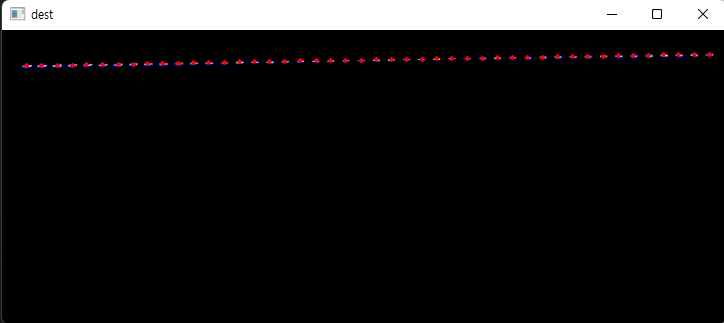
  (3) 이렇게 찾은 개별 Emitter에 대해 Cv2.Moments 함수를 이용하여 Emitter의 중심점 좌표를 찾는다. 

빨간색 점이 각 Emitter의 중심좌표이다.

  (4) Contour 정보와 중심점 좌표를 이용하여 각 Emitter의 Mask 이미지를 생성한다. 

  (5) 생성된 Mask 이미지와 소스 이미지를 이용하여 각각의 Emitter에 대해 평균값을 계산하여 Intensity를 구한다. 

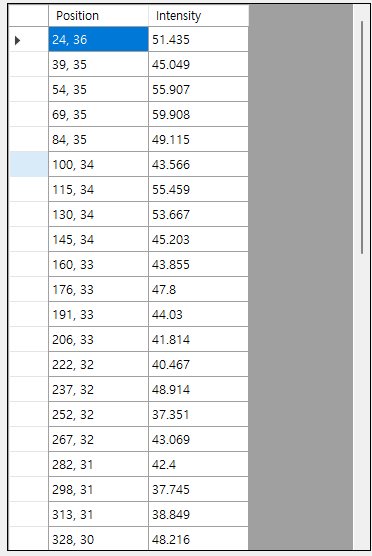
  (6) 저장된 List는 Emitter의 순서가 뒤죽박죽이기 때문에 위치의 X값을 기준으로 Sort를 해야 한다.

저장된 NFP 정보

4. 구현된 클래스

public class EmitterInform     // Emitter 정보를 저장하기 위한 클래스 
{
    public System.Drawing.Point Position { get; set; }     // Emitter 의 위치 좌표
    public double Intensity { get; set; }               // Emitter 의 밝기 

    public EmitterInform(System.Drawing.Point Position, double Intensity)
    {
        this.Position = Position;
        this.Intensity = Intensity;
    }
}
//----------------------------------------------------------------------------------------------------
public class NFP_Process
{
    private Mat sourceImage;
    private int ThresholdRangeMin = 10;
    private int ThresholdRangeMax = 255;

    //----------------------------------------------------------------------------------------------------
    public NFP_Process()
    {
        sourceImage = new Mat();
    }
    //----------------------------------------------------------------------------------------------------
    public void imageLoad(string fileName)
    {
        sourceImage = Cv2.ImRead(fileName, ImreadModes.Grayscale);
    }
    //----------------------------------------------------------------------------------------------------
    public void imageLoad(string fileName, PictureBox pictureBox)
    {
        sourceImage = Cv2.ImRead(fileName, ImreadModes.Grayscale);
        pictureBox.Image = BitmapConverter.ToBitmap(sourceImage);
    }
    //----------------------------------------------------------------------------------------------------
    public void setThresholdRange(int Min, int Max)
    {
        if (Max > Min)
        {
            if (Min > 0 || Min < 256) ThresholdRangeMin = Min;
            if (Max > 0 || Max < 256) ThresholdRangeMax = Max;
        }
    }
    //----------------------------------------------------------------------------------------------------
    public int SearchEmitters(List<EmitterInform> emittersInforms)
    {
        int Count = 0;  // emitter 갯수  
        Mat binaryImage = new Mat();

        Cv2.Threshold(sourceImage, binaryImage, ThresholdRangeMin, ThresholdRangeMax, ThresholdTypes.Binary);   // Source Image를 이진 이미지로 변환한다. 
        Cv2.FindContours(binaryImage, out OpenCvSharp.Point[][] contour, out HierarchyIndex[] hierarchy, RetrievalModes.Tree, ContourApproximationModes.ApproxSimple);  // Emitters 의 외형을 추출한다. 

        emittersInforms.Clear();

        if (contour.Length > 0)     // emitter를 정상적으로 찾았을 경우 
        {
            foreach (var emitter in contour)
            {
                Moments mmt = Cv2.Moments(emitter);     // emitter의 모멘트 정보를 추출

                int cx = (int)(mmt.M10 / mmt.M00);   // emitter 중심점의 X 좌표
                int cy = (int)(mmt.M01 / mmt.M00);   // emitter 중심점의 Y 좌표

                if (cx > 0 && cy > 0)
                {
                    Mat mask = Mat.Zeros(sourceImage.Height, sourceImage.Width, MatType.CV_8UC1);  // 마스크 이미지를 초기화 한다. 
                    Cv2.DrawContours(mask, contour, Count, Scalar.White, 2, LineTypes.Link4, hierarchy);  // Emitter 의 외형을 그린다. 
                    Cv2.FloodFill(mask, new OpenCvSharp.Point(cx, cy), Scalar.White);  // mask 이미지에서 Emitter 외형의 내부를 채운다. 

                    Scalar value = Cv2.Mean(sourceImage, mask);  // 소스 이미지에서 마스킹된 emitter의 Pixel 값들의 평균을 구한다. 

                    emittersInforms.Add(new EmitterInform(new System.Drawing.Point(cx, cy), Math.Round(value.Val0, 3)));  // emitter 정보를 저장한다. 
                    Count++;
                }
            }

            emittersInforms.Sort((InformA, InformB) => InformA.Position.X.CompareTo(InformB.Position.X));     // searching 된 emitter들을 X 좌표값을 기준으로 sorting한다. 
        }

        return Count;
    }
    //----------------------------------------------------------------------------------------------------
}

5. 사용방법 


private void button2_Click(object sender, EventArgs e)
{

    NFP_Process nfp_Process = new NFP_Process();    //class 객체 생성

    List<EmitterInform> emitterInforms= new List<EmitterInform>();  // Emitter 의 정보가 저장될 List
    nFP_Process.imageLoad("nfp_image.png");  // 저장된 이미지 loading

    int count = nfp_Process .SearchEmitters(emitterInforms);  // NFP search
    dataGridView1.DataSource = emitterInforms;  // 써칭된 정보를 dataGridView 에 출력 
}


6. 기타 

  (1)저장된 영상의 상태에 따라 ThresholdRangeMin, ThresholdRangeMax 값을 조정하면 더 정확한 정보를 추출할 수 있다,

반응형

댓글()